Training where you can see who finished
Courses, tests, mandatory training, webinars and onboarding in one place. HR sees who hasn't completed it, and a manager sees their own team.
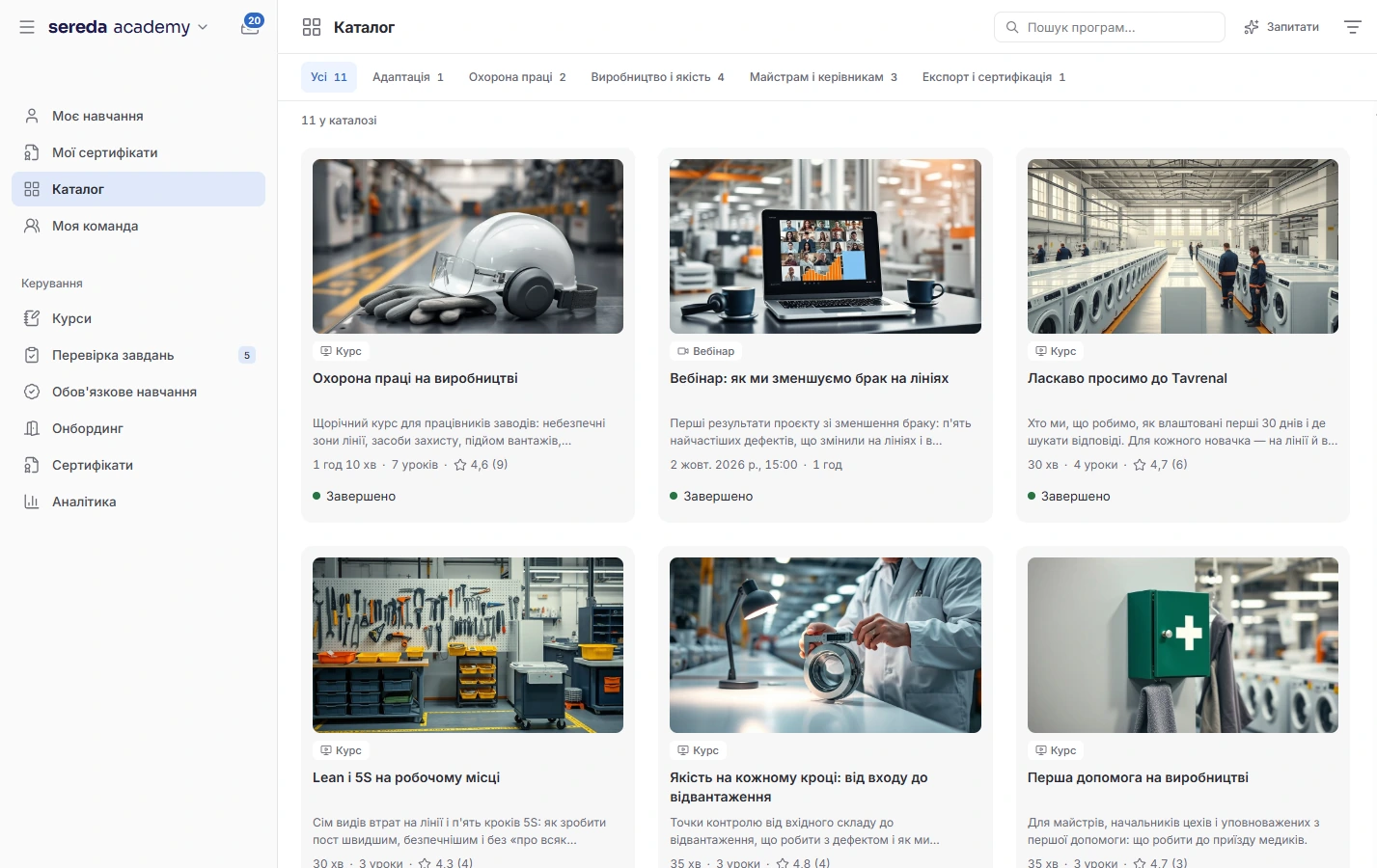
Build a course from what you already have
Build a course from lessons of four types: video, test, practical assignment or SCORM package. A video can be uploaded as a file, connected from YouTube or Vimeo, or added as a link.
When you have many courses. Combine them into a program: the order is changed by dragging, and each course can be mandatory or optional. A program is completed once all the mandatory courses are done.
Lesson text. AI formats it: it adds headings and highlights key terms. The same can be done for all the lessons of a course at once.
A test that really checks
Questions of three types: single choice, multiple choice and a text answer. For a test you set the passing score, the number of attempts and the time limit.
Open answers and practical assignments are reviewed by a person: they have a queue, and an answer can be sent back for revision. A participant can ask for a deadline extension.
After a course or program is completed, the system issues a PDF with a QR code. Anyone can use it to verify authenticity without logging in. You set the validity period in months or leave it unlimited.
Mandatory training without manual reminders
Create a rule: which course, for whom (everyone, a department together with its sub-departments, or a position) and how many days to complete it. For training that needs to be renewed, set a repeat every few months.
Who did what. The compliance report shows how many people have completed it, how many are in progress and how many are overdue, and every number can be expanded into a list of names. Three days before the deadline the system sends a reminder on its own, and HR or a manager can send one manually.
New people. In a new rule, auto-enrollment and “New employees” are turned on from the start. Every day the system checks who falls under the rule and enrolls new employees and those who moved to another department.

Webinars and events alongside courses
Create a webinar or an offline event: date, time, seat limit, host. For an online meeting, enter a link to Zoom, Google Meet or Teams. If the integration is connected, Sereda creates a Google Meet or Zoom meeting itself. The event will appear in Calendar.
When no seats are left, a person goes onto a waitlist and moves into the list as soon as a seat frees up. Invite external participants by email or give them a link to public registration.
Attendance is marked with a QR code. Participants get a reminder a day and an hour before the start, and a day after the event they receive a request for feedback. A recording can be added to the event.
Onboarding as a program, not a spreadsheet
Assemble a sequence of steps for a new hire: take a course, read a page from Spaces, sign a document, attend a meeting, complete a task, assign a buddy, get an approval.
An owner for every step. In a step you specify who completes it: the employee, the manager, HR or the buddy. A step can be mandatory or optional and is tied to a particular day.
Launch. A program can be started manually for selected people or set to start automatically on hire, separately for a department or a position. The list of runs shows the status and progress of each person.
HR and managers see where training gets stuck
The dashboard shows active participants, registrations, completion rate compared with last month, average score, learning hours and overdue courses. Separately you can see a comparison of departments, an engagement funnel and the status of each course.
A manager sees the training of their direct reports and can remind those who are falling behind. Completed courses are also visible in the employee profile.
Data can be exported to XLSX: per course or for the whole company.
Academy takes departments and positions from People; you connect the rest as needed
An employee sees their own training, a manager sees their team
An employee sees their courses and the catalog. A manager additionally sees the training of their direct reports. HR and the admin see the training across the whole project.
A certificate's authenticity is verified by QR code on a public page, without logging in. It shows the owner's name, the course title, the certificate number and the dates.
SCORM files are opened only by those who have access to the course, and access is checked on every request.
How Sereda protects dataWhich SCORM formats are supported?
SCORM 1.2 and SCORM 2004. You upload a .zip package, it opens right in the lesson, and the result is returned to the course. The xAPI and cmi5 formats are not supported at the moment.
Can the certificate's appearance be changed?
For each course you set the signer's name and position, the accent color and the validity period. There is one certificate design, and there is no template choice at the moment.
When does a new employee get the mandatory courses?
If auto-enrollment is turned on in the rule, the system checks the rules every day and enrolls new employees and those who moved to another department. For training to start on the first day at work, use an onboarding program with auto-start on hire.
Do webinars take place inside Sereda?
Registration, the waitlist, attendance marking and feedback work in Sereda. The broadcast itself runs in Zoom, Google Meet or Teams. Sereda can create a Google Meet or Zoom meeting itself if the integration is connected.
Can I limit who sees a course?
Yes. A course can be in an open catalog with self-enrollment, hidden from the catalog, or available on request: the participant asks, and an admin approves or declines.
We'll show you Academy on your processes
30 minutes: we'll go through which training is mandatory for you and how you check that it's completed, and show how it will look in Sereda.