Surveys with anonymity you can verify
Twelve question types, conditions and branches, scheduled repeats. In anonymous surveys, results appear after closing, from five responses, with no custom filters.
question types in the editor
minimum responses to see an anonymous result
repeat options: weekly, every two weeks, monthly
Question types that cover any topic
Pick the question type: rating scale, NPS, single and multiple choice, open text, matrix, ranking, fill in the blank, card sorting, point allocation, a 0 to 100 scale, and “best or worst”.
Start from a system template, save your own, or add questions from a template to an existing survey. There are classic one-time surveys and “Pulse”, a regular short survey for tracking trends.
Admins and HR see the questionnaire as an employee does: responses are not saved in this mode. Only a draft can be edited.
Conditions and branches
A question can be shown by condition based on the answer to the previous one: equals, contains, greater than, less than, answered or not.
Branches. The flow builder creates surveys with branches, groups, and endings. Surveys with branches are available on paid plans.
Who, when, and with reminders
Audience: all employees, selected departments from the tree, positions, or chosen people. Units can be excluded, and the audience composition is visible before launch.
A survey starts immediately or on a chosen date, has an end date, and closes automatically. Late responses can be allowed.
Invitations arrive in Inbox and by email, and every day the system sends a reminder as the deadline approaches. The employee sees a banner saying that surveys are waiting for them.
Repeats without manual work
A survey can repeat weekly, every two weeks, or monthly. You set the date of the first run, the time, the time zone, and how long responses are collected.
Separate results. Each repeat has its own responses and results. The run history is kept, and the schedule can be paused and resumed.

Anonymity you can verify
In an anonymous survey, respondents' names and emails are hidden. Results are published as one set after the survey closes; while it is running, there are no aggregates.
Publication requires at least five completed responses, and questions with fewer responses are hidden. Departments with few responses are merged into their parent departments, and custom filters by department, position, or date are not allowed, including for AI and CSV.
This is not differential privacy. It does not protect against identification from what a person wrote themselves in open text, or from knowledge of other people's responses.
Analytics that explain
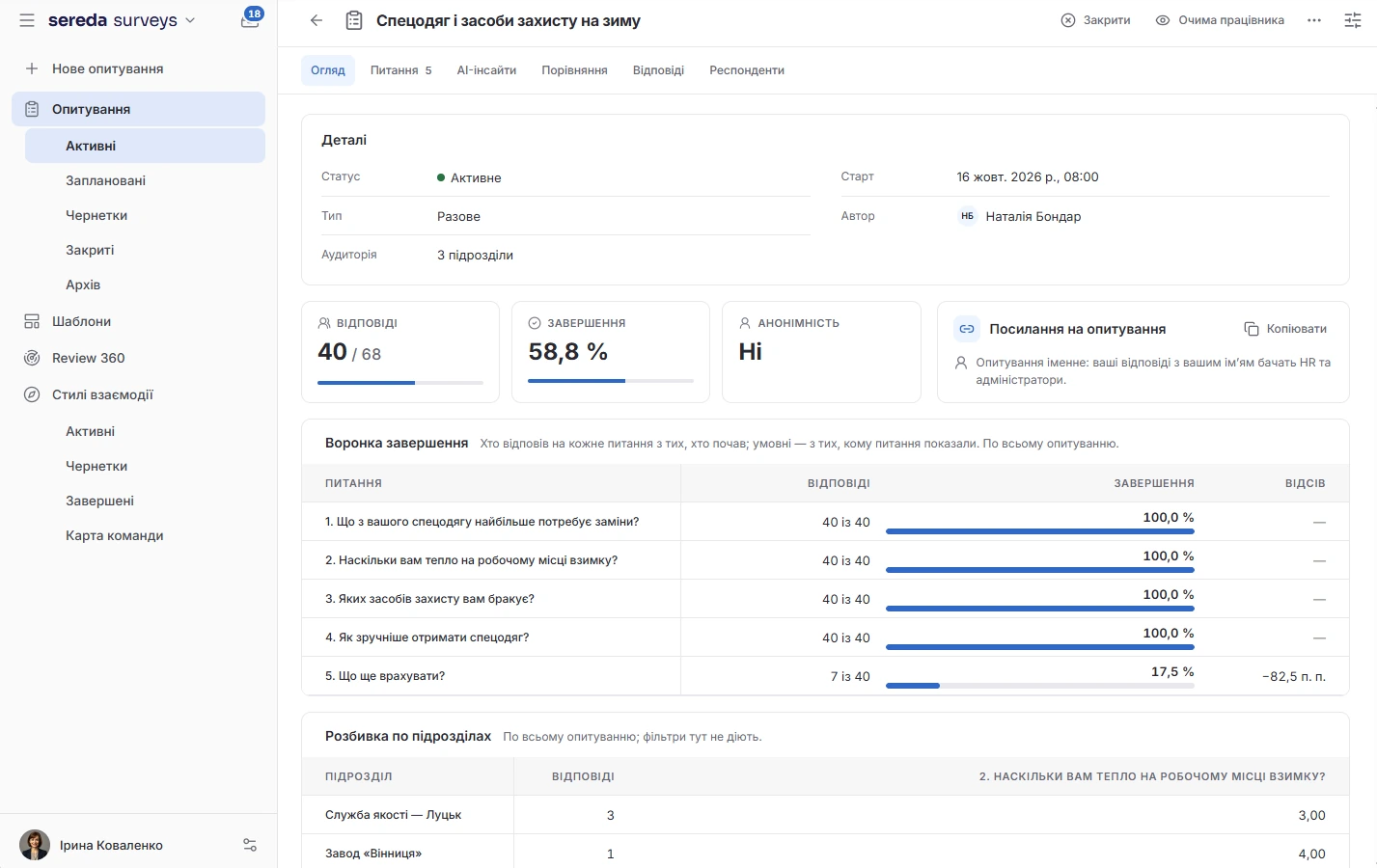
The overview shows the completion rate, the funnel, and the average time. Results are broken down by question and by department, and two departments can be compared with each other.
Open responses. AI picks out themes in open responses and produces a summary. In anonymous surveys it works only with the published set.
Comparison and export. Two surveys in one project can be compared with each other. Results are exported to CSV, and for non-anonymous surveys you can choose a slice: everyone, by department, by position, or specific people.
Surveys work on their own, and departments, goals, and learning connect from other modules
Admin and HR see the results, and a manager sees only their own reports
Admin and HR create, launch, and close surveys. Admin and HR see all results.
In non-anonymous surveys, a manager sees only the results of their direct reports and their own.
A respondent sees results only if this is turned on in the survey, and only after their own response. In anonymous surveys this is possible after closing and publication.
How Sereda protects dataWhen are the results of an anonymous survey visible?
After the survey is closed or archived, as one set, and only if at least five responses are completed. Questions with fewer responses are hidden. While the survey is running, there are no aggregates.
Does anonymity guarantee that no one can be identified?
No. The protection is not differential privacy: it does not guard against what a person wrote themselves in open text, or against outside knowledge of other people's responses.
Can surveys repeat on a schedule?
Yes: weekly, every two weeks, or monthly. Each repeat has its own responses and results, and the schedule can be paused.
Are there industry benchmarks?
No. Comparison works between two surveys in your project, and is available to the admin and HR.
Can results be exported?
Yes, to CSV. For an anonymous survey, the file contains only aggregated values, without respondent rows.
We'll show you Surveys on your survey
30 minutes: we'll go through what you currently survey employees about and how it works, and show how that will look in Sereda.