A chat that knows your org structure
Company and department channels are created automatically, and a new person lands in the right conversations without manual work. The admin manages channels but does not read other people's messages.
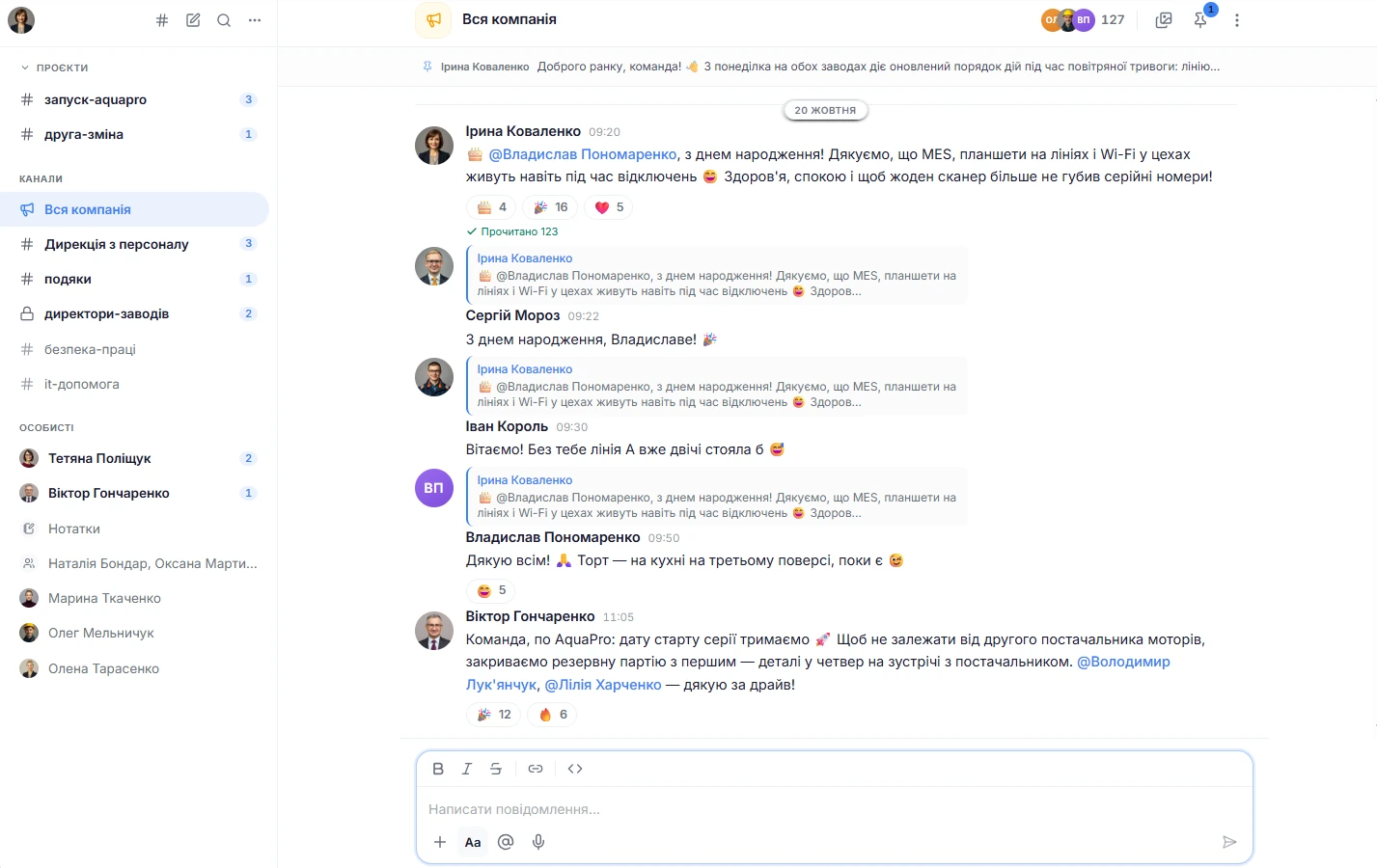
Channels from the org structure create themselves
The “Whole company” channel and a channel for each department appear automatically. A new person is added to them when they join a project or move to a department, and a person who has left the company is removed from the channels. Their messages stay.
Your own conversations. Besides these channels, you can create public and private channels, direct conversations, and group chats. Public channels are listed in the directory, and you can join them yourself.
Order in the list. Conversations are sorted into your own sections, and “Notes to self” gives you a private place for drafts and reminders. A channel you no longer need is archived: the history is kept, and the archive is read-only.
Messaging, search, and notifications
Format text: bold, italic, strikethrough, code, links. Mention colleagues with @, add emoji reactions, reply with a quote, and forward messages to up to five conversations at a time.
Files. Up to ten files per message, each up to 25 MB: images, Office documents and PDFs, archives, video, and audio. Video and audio play right in the feed.
Voice. A voice message is recorded right in the browser and attached to the conversation.
Search runs across all your conversations and can be narrowed by conversation and by date. It searches by the words in messages.
Important things at hand. Pin up to 50 messages in a conversation, and all participants will see them in one place. Every conversation has “Media,” “Files,” and “Links” tabs.
Export. A conversation's history can be exported to .txt or .md for a chosen period, up to 5,000 messages at a time.
For each conversation, you choose: all messages, mentions only, or no notifications. Mentions and direct messages go to “Inbox” and arrive as browser push notifications, while channel messages without a mention stay only in “Inbox”.
Quiet when you need it. The “Do not disturb” status can be turned on for 30 minutes, an hour, until tomorrow, or until you turn it off. There is also an “On vacation” status. Colleagues can see that you were active recently. Notification sound is turned off separately.
Counters. The unread counter is visible in the conversation list and on the chat button on other pages. A conversation can be marked as unread to come back to it later.
From conversation to task
If Boards is connected, a task is created from a message on the board you choose, and a reply with its number comes back into the conversation. A task can also be created without a message, from the “+” menu in the message field.
Cards instead of links. A task number in the text becomes a card with its title, and “Mention a task” suggests tasks from the list.
Goals. If Goals is connected, a goal is inserted into a message as a card through “Mention OKR”.

The admin manages channels rather than reading messages
The admin and HR rename and archive channels and turn on the “Announcements only” mode: in such a channel, only the owner, a moderator, and the admin can post.
A moderator or admin deletes other people's messages in channels, but not in direct conversations. Each such deletion is recorded in the audit log.
Deleting erases the text, reactions, and attachments. Reactions in company and department channels are shown only as counts, without names.
Chat takes people and departments from People, and you connect the rest as needed
Only participants can see a conversation's content
This applies to public channels too: they can be found in the directory and joined, but they cannot be read without joining. An admin does not read a private channel unless added to it, and direct messages are not subject to moderation.
Files open through a signed link that is valid for ten minutes.
Only the author can edit a message.
How Sereda protects dataCan an admin see my private conversations?
No. Direct messages are not subject to moderation, and an admin does not read a private channel unless added to it. An admin can delete other people's messages only in channels, and each such deletion goes into the audit log.
Are there calls and threads?
There are no calls or video meetings in Chat, but there are voice messages. There is also no separate threads panel: a reply with a quote is shown in the main feed.
Which files can I send?
Images (JPG, PNG, GIF, WebP), documents (PDF, Word, Excel, PowerPoint, TXT, CSV, MD), archives (ZIP, RAR, 7Z), video (MP4, MOV, WebM), and audio (MP3, M4A, OGG). Up to ten files per message, each up to 25 MB.
How do I set up notifications?
One of three levels is chosen for each conversation: all messages, mentions only, or no notifications. Regular channel messages without a mention create notifications only for those who have “all messages” turned on, and only in manually created channels with up to 250 members.
Can I export the history?
Yes. A conversation can be exported to .txt or .md for a chosen period, up to 5,000 messages at a time.
We'll show you Chat on your org structure
30 minutes: we'll go through how your departments and conversations are set up today and show which channels Sereda will create on its own.