360 review from questionnaire to calibration session
Collect self-assessments and ratings from the manager, peers, and direct reports. HR sees the results together with the gaps for the calibration session, and the person receives their report when HR publishes it.
Questionnaire from your competency bank
Build the bank: competencies with categories, levels, and questions. For each question you choose who answers it: the person about themselves, the manager, peers, or direct reports.
Wording. A separate first-person wording can be set for the self-assessment. The scale is always from 1 to 5, and the score descriptions can be changed for an individual question.
Scale check. Anchor questions are asked in every questionnaire, and the scale is checked against them.
Reviewers are assigned by org structure
Add participants and run auto-assignment: the system takes the manager from the org structure and selects peers and direct reports in the specified number for each participant, balancing the workload across people.
The reviewers of each participant can be changed manually. Before launch there is a readiness check: questions, participants, managers, start date, and deadline.
Self-assessment, peers, and direct reports can be turned off for the entire cycle. The questionnaire can be previewed before launch.
Anonymity is protected by a threshold
For each cycle you set an anonymity threshold from 2 to 10. Ratings from peers and direct reports and their open-ended responses are shown only once at least that many questionnaires have come in.
What is visible. The manager's rating and the self-assessment are not anonymous: there is only one manager, so their rating is visible anyway. Open-ended responses from peers and direct reports are shown without names and in shuffled order.
Launch and changes. Before launch, the system warns which groups of questionnaires have fewer than the threshold: people will respond, but the report will hide those responses. In a cycle that is underway, the threshold can be raised right away but lowered only with confirmation.
Collecting responses without manual reminders
Invitations and reminders three days and one day before the deadline arrive in Inbox and by email. The questionnaire with its completion progress is visible on the home page, responses are saved as you go, and after submission they can no longer be changed.
The cycle starts by itself on the start date and ends by itself after the deadline. HR gets a card with the number of questionnaires that never came in.
A person has left the company or gone on vacation: a participant or an individual questionnaire can be removed from a cycle that is underway, with a reason given, and restored. Nothing is deleted. After launch, the questions and the reviewer matrix no longer change.
Report for the calibration session
The talent matrix places each participant on two axes: Performance (all ratings of the current level excluding self-assessment) and Potential (only the manager's rating on a separate competency). Each box has an explanation of what to do with it.
Signals. Divergences worth discussing are shown separately: blind spots (self-assessment higher than the rating from others by one point or more), hidden strengths, and the gap between the manager and peers.
All breakdowns. A “competencies by participants” heatmap, a company competency map, ratings as seen by each group, response collection by participant, and each person's individual report.

A person gets the report when you decide
HR publishes the results after the calibration session and can hide them again. Before publication, the person does not see their report.
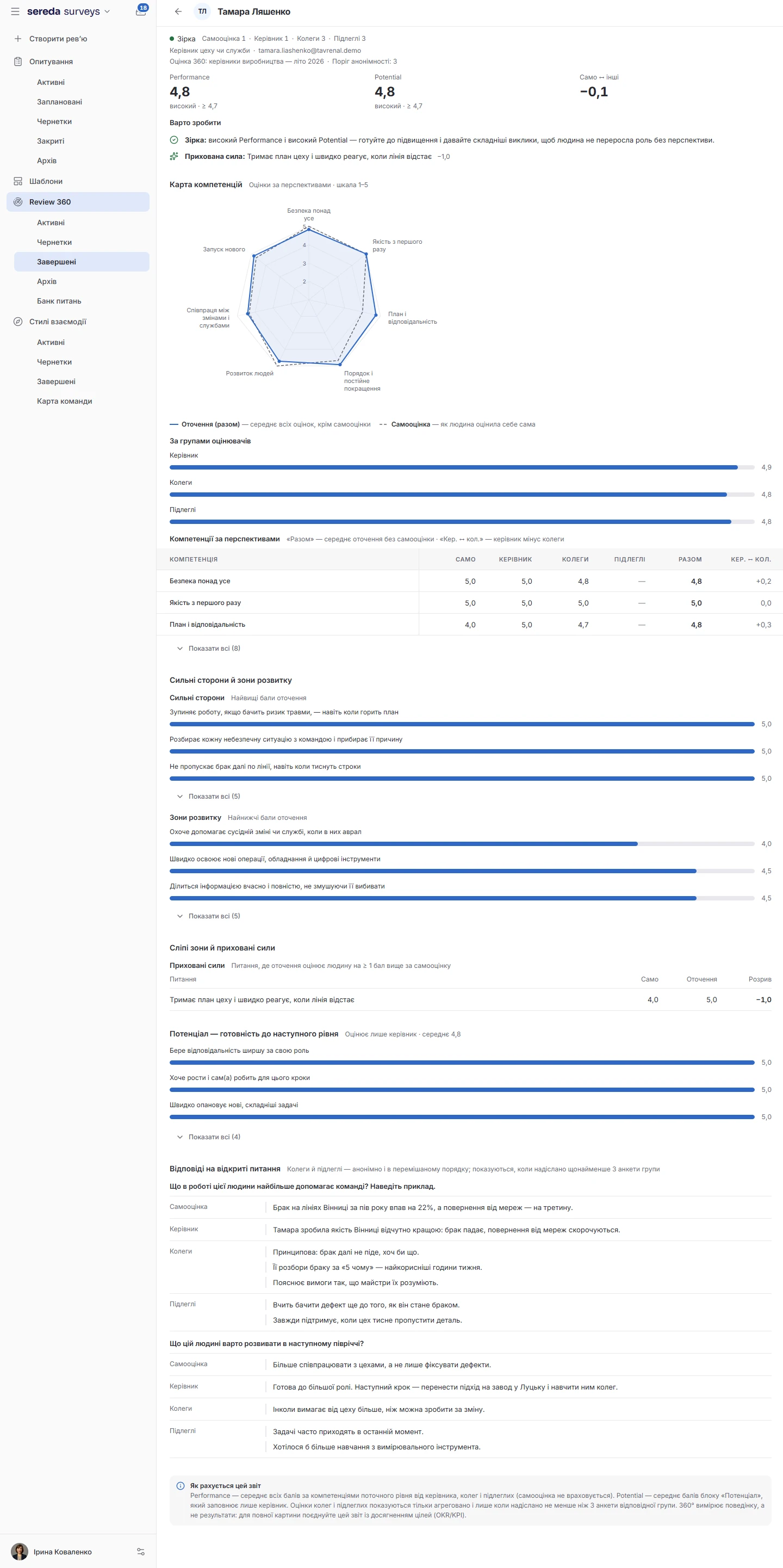
A development report: a competency map with self-assessment and ratings from others, strengths, development areas, and open-ended responses. It does not include the talent matrix, axes, or calibration gaps.
Competencies from the latest published report are visible in the employee's profile in People.
Performance takes managers and participants from People
HR sees the reports, a person sees only their own, and only after publication
They read the cycle report and individual reports.
Sees only the questionnaires they fill in.
Sees only their own report, and only after HR has published it. Before publication, the report is not available to them.
Participants and questionnaires removed from the cycle disappear from the report and from the calculations, but remain in the system with a note of who removed them and when.
Who sees peers' responses?
Ratings from peers and direct reports are shown only once at least as many have come in as the anonymity threshold you set for this cycle, from 2 to 10. Open-ended responses are displayed without names, in shuffled order. The manager's rating and the self-assessment are not anonymous.
Does a manager see the report of their direct report?
Only the admin and HR see the full cycle report. A direct manager sees a snapshot of the direct report's competencies in their profile once HR has published the results, but not the talent matrix.
Can the questions be changed once a cycle is underway?
No. The questions and the reviewer matrix freeze at launch. You can remove a participant or an individual questionnaire from the cycle and restore them, and the anonymity threshold can be raised or, with confirmation, lowered.
What if a participant has no manager in the org structure?
Before launch, Performance will warn you about such participants. They will go through the review without a manager questionnaire.
Does the cycle repeat automatically?
No. The “Frequency” field only marks the rhythm: one-time, weekly, monthly, quarterly, every six months, or yearly. You create a new cycle manually, for example, by duplicating the previous one.
Is there always a talent matrix?
It requires the “Potential” competency, which only the manager rates. Without it, the matrix is unavailable, and Performance is shown in the participants table. At the Expert level, Potential is not calculated, and such people are reviewed separately.
We'll show you Performance on your competency model
30 minutes: we'll go through which competencies and levels you already have and show how a review cycle and a report for the calibration session are built from them.