Analytics built from the data of your HR modules
Headcount, turnover, goals, learning, engagement and risks: all from the data of the modules you already use. A manager sees their departments, HR sees the whole company.
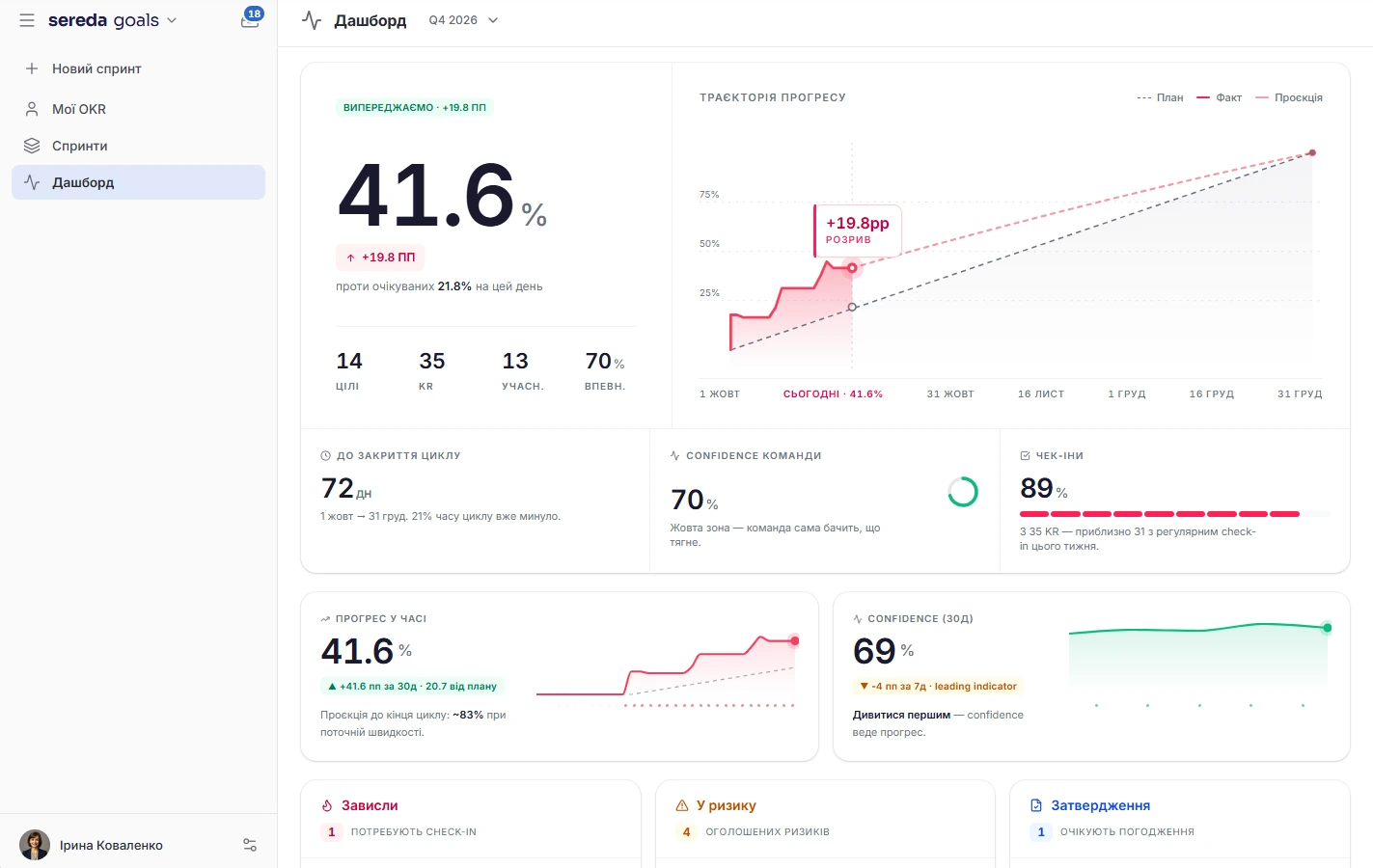
A leadership summary on one screen
The “Summary” tab shows headcount and turnover for the quarter, eNPS from the latest survey, the state of goals, learning progress, candidates in the hiring process and open positions, who is at work and who is on vacation today, birthdays, new employees and items that need action. Each action item expands into details.
Daily hints. Every morning the system checks the data against rules and compiles hints: attrition risk, skills held by a single person, a drop in a survey score, goals at risk, stalled development plans, readiness for promotion, learning progress.
Connected modules. Each tab shows data from the modules that are connected. If a module is unavailable, the tab says so.
Headcount and turnover by department
Overview shows headcount, hires, departures and net growth for the month, turnover overall and by department, distribution by tenure and by department, and open positions.
Trends. A separate chart shows hires, departures and total headcount over time.

Engagement, vacations, learning and productivity
Engagement collects the survey score and response rate, vacations by type and by month, and who is on vacation today.
Separate tabs: Overview, Headcount, Vacations, Learning, Productivity and Onboarding. Vacations shows who is absent today and this week and how many requests are awaiting review.
In learning: course completion, enrollments, certificates, the most active learners. In productivity: completed tasks, logged hours, overdue tasks and cards per board. In onboarding: active processes, average duration and progress.
Goals, skills and learning
The “Performance” tab shows the active OKR sprint: how many goals are on plan, at risk and behind, and the status of goals by department.
Skills and development. The “Skills” tab shows skill gaps, skills held by a single person, development plans and learning progress in Academy.
A talent matrix from the data you already have
On the dashboard, the matrix places people along two axes. Performance comes from the progress of their OKR goals, and potential from competencies, learning, and career readiness. Departments can be compared.
Not the same as in Performance. The matrix in Performance is calculated from 360 review questionnaires. This is a separate matrix with different data sources.
Attrition risk that breaks down into factors
The “Forecasts” tab shows an attrition risk score from 0 to 100 and a level: low, medium, or high. This is not a model but transparent rules: for each score, you can see the factors it is made up of.
Signals from goals, surveys, vacations, career goals, and development plans, as well as tenure. An active development plan lowers the risk.
Who is ready for promotion is shown separately, along with the succession pipeline.
Analytics collects data from your modules
Managers see their own departments, HR sees the whole company
See the whole company.
Sees only people from the departments they manage and from their own main department.
If a module is not connected, the tab says so instead of showing empty charts.
Where does the attrition risk score come from?
It is a score from 0 to 100 calculated by rules, not by a trained model. Levels: low below 40, medium from 40, high from 70. For each score, you can see the factors it is made up of.
Is the talent matrix calculated the same way as in Performance?
No. On the dashboard, performance comes from OKR goal progress, and potential from competencies, learning, and career readiness. The matrix in Performance is calculated from 360 review questionnaires.
Do I need other modules?
The staff overview works on People data. The other tabs show data from the modules that are connected: goals, surveys, learning, vacations, boards, or onboarding.
How often are the suggestions updated?
Daily: every morning the system checks the data against rules and builds new suggestions.
Can I export a report to PDF or Excel?
There is currently no dedicated export button in Analytics.
We'll show you Analytics on your data
30 minutes: we'll go through which Sereda modules already give you data and show how it comes together in a dashboard.