Task boards that show what's on fire on their own
Columns built around your process, backlog and sprints, links to goals, chat, and meetings. The system highlights tasks that are stuck, overdue, or left without an assignee.
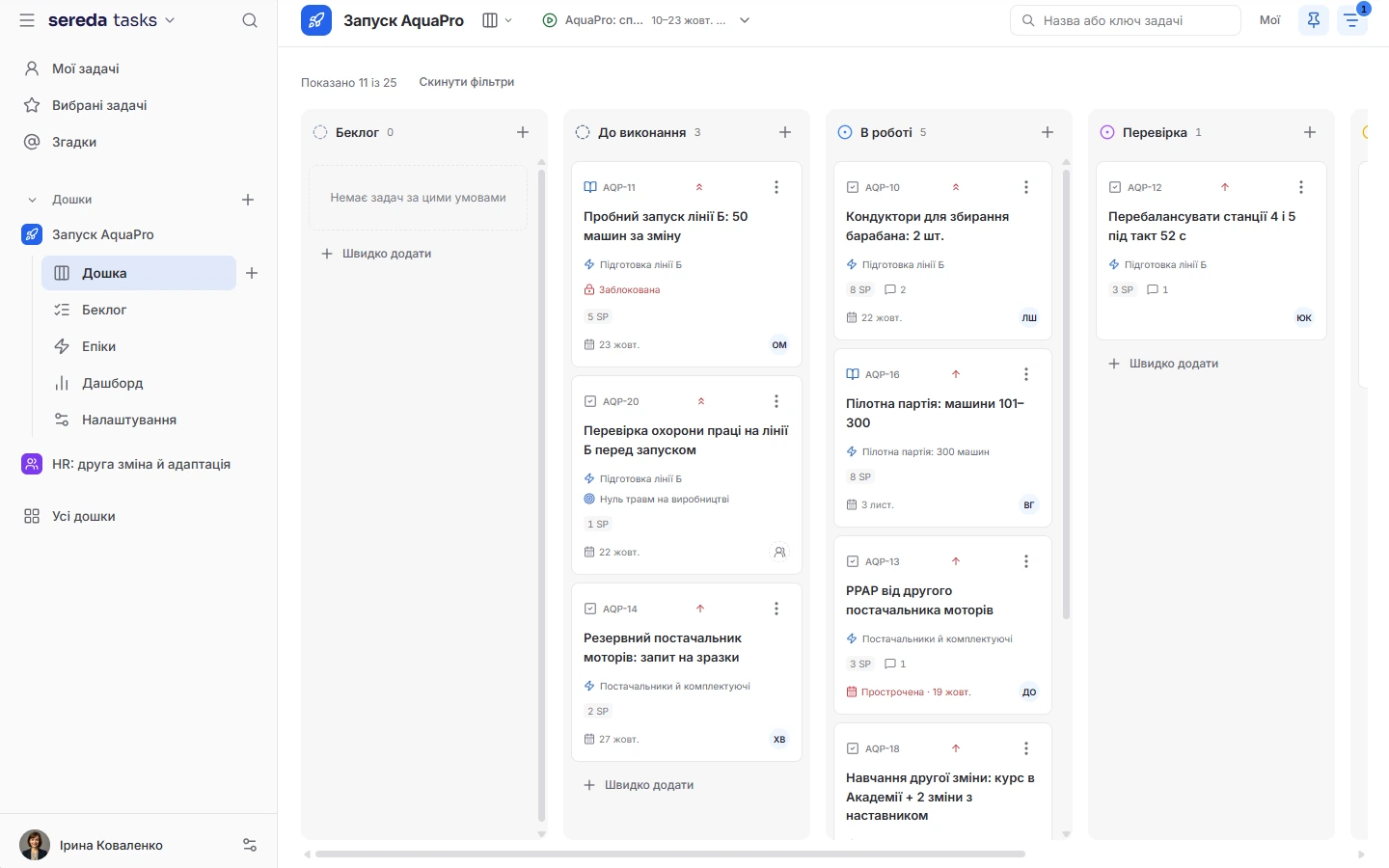
A board built around your process
Board columns are statuses: you can add, reorder, and hide them. You choose which fields the card shows: assignee, deadline, epic, estimate, labels, priority, subtasks.
Types and priorities. There are six task types: initiative, epic, story, task, bug, and subtask, and five priority levels.
Finding what you need. Quick filters by assignee, epic, label, and deadline range, saved filters, and search across the board.
Backlog and sprints without unnecessary ceremony
In the backlog, tasks are moved into a sprint or back with bulk actions, and status and deadline can be changed for several tasks at once. A sprint has a name, a goal, and dates.
Closing. When a sprint is closed, unfinished tasks are carried over or returned to the backlog, all together or selectively. Closed sprints stay in a separate list.
Planner. Before a sprint starts, tasks can be sorted using the Eisenhower matrix: do, schedule, delegate, cancel. The sum of estimates is visible right away, and nothing changes until you confirm the plan.
A task with everything in one place
A description with embedded images, attachments, watchers, and links to other tasks: blocks, relates to, duplicates, causes, clones.
Discussion. Comments can be edited, deleted, liked, and replied to in threads, and colleagues can be mentioned with @. Mentions are collected in a separate feed.
Time and history. Time can be tracked on a task, and the activity log shows who changed what.

What's on fire: signals and suggestions
The board highlights tasks that need attention: overdue, due soon, blocked with no movement, stuck in progress, high priority with no assignee, blocking others, tied to goals at risk, and those that may derail a sprint. These signals are calculated by rules.
A separate insights window recommends where to start: blocking chains, possible duplicates, discussions with no movement, workload, a gap between tasks and goals. Task names are taken from your board, not made up by a model. A label shows whether the analysis was done by AI.
From a suggestion, you can highlight tasks on the board, remind the assignee, link duplicates, or open a chat. An insight can be rated as not relevant. When Leave is connected, the board warns that the assignee has an approved vacation.
Links to Goals, Chat and meetings
If Goals is connected, a task can be linked to a goal or key result, and the system suggests which one.
Chat. A task is created from a message in Chat, and the task number in the message becomes a card.
Meetings. If Bluedot is connected, tasks heard in a recorded meeting land in the backlog as proposals. Only the assignee can confirm or reject them: confirming does not move the task into progress, and a rejected one stays in the backlog together with a comment.
Access to personal boards has no exceptions
A public board is visible to every member of the space. A personal board is visible only to its author and the people invited: there is deliberately no exception for the admin, HR, or super admin.
Columns, components, archive, and import are configured by the board's author or the space admin, and any member can create a board. There is an access list, plus favorite and recent boards.
Email notifications are set up for each board: a general toggle and individual events.
Boards runs on its own, and links to other modules are added as needed
A personal board is closed to everyone except those invited
Only the author and invited people can see a personal board. The space admin, HR, and super admin cannot see it.
Sprints are started, edited, and closed by the board's author, an admin, or a manager.
Task proposals from meetings are confirmed only by the assignee. The admin and HR cannot do this on the assignee's behalf.
How Sereda protects dataCan I move tasks over from Jira?
Yes, through a CSV file from Jira. Board settings include a dry run, which shows what will be imported, and the import itself. The board's author or the space admin can do this.
Can an admin see a personal board?
No. Only the author and invited people can see a personal board. There is deliberately no exception for the admin, HR, or super admin.
Does AI highlight tasks?
The “Needs attention” signals are calculated by rules. A separate insights window is built by AI, but task names are taken from your board, not from the model's response. A label shows whether the analysis was done by AI.
Who can start and close sprints?
The board's author, the space admin, or a manager. When a sprint is closed, unfinished tasks can be carried over or returned to the backlog.
What happens to a task created from a meeting?
It lands in the backlog as a proposal, and only the assignee decides whether to accept or reject it. Confirming does not start the work, and a rejected task stays in the backlog with a comment.
We'll show you Boards on your tasks
30 minutes: we'll go through how you currently manage tasks and sprints and show how it will look on a Sereda board.