OKRs that run from the company to every person
Plan goals as a cascade, get them approved by the manager and run check-ins. Progress can calculate itself: from courses, logged hours, surveys and Jira.
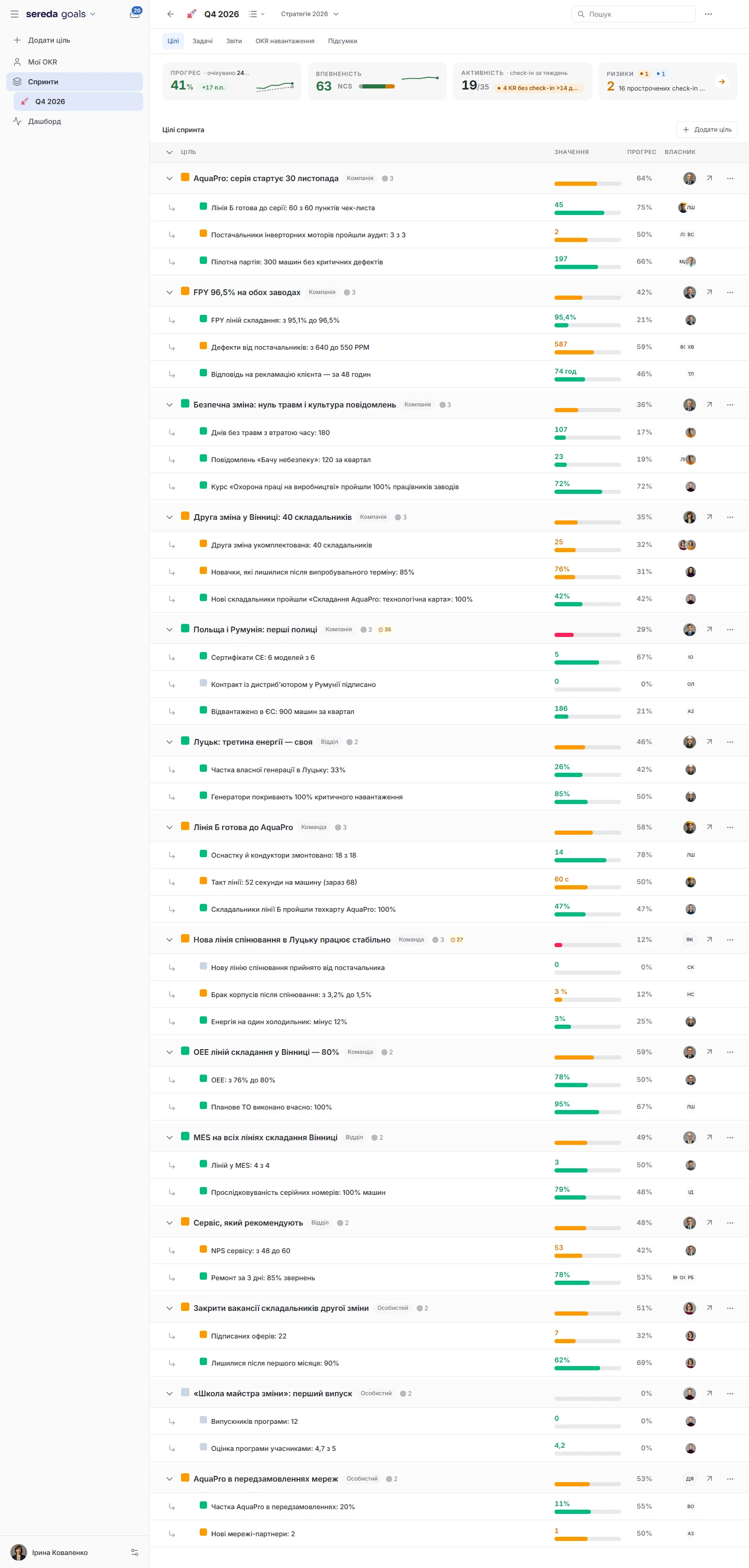
Planning as a cascade from company to person
A sprint goes through planning phases: company, departments, teams, personal goals. You open the next phase once the previous one is complete, and when a sprint is activated, the system warns you if the cascade is not finished yet.
Linking. Every goal can be linked to a parent goal. In the sprint settings, this link becomes mandatory, and personal goals can be prohibited. The scoring method is also your choice: percentages, the OKR scale from 0.0 to 1.0 or a traffic light.
Relationships. In addition to the hierarchy, goals can be marked as blocking one another, duplicating one another or related. To get started, there are 20 goal templates in six areas with recommended key results.
Goals that get approved before the start
If manager approval is turned on in a sprint, new goals start as drafts. The author submits a goal for approval, and for this it must have at least one key result. The manager approves it or rejects it, and a goal can be rejected only with a reason.
If an approved goal is changed substantially, for example by adding or removing a key result or changing a weight, it goes back for approval. Batch approval is available too.
When a goal stays unapproved for a long time, the system reminds the manager and later escalates to admins. You set the number of days yourself. Approvals are written to the audit log.
A check-in takes a minute, and the history stays
A key result is measured in percentages, numbers, money or as “yes or no.” It has a start value and a target value, a weight and a direction: whether more or less is better. A check-in records the new value, confidence and a comment, and the edit history is preserved.
Nested results. A key result can be split into parts that count toward the parent. A separate option, the “driver,” is a result that is expected to lead to the parent result but does not feed into its progress.
Reminders. The system reminds people to check in weekly, every two weeks or monthly. The day, hour and time zone can be set for each sprint. Under a check-in, colleagues can leave a reaction or a comment.

Progress that calculates itself
For a key result, you can choose automatic tracking: completed courses from Academy, hours logged by the goal owner in Time tracking, or a survey result from Surveys. For surveys, the average score from rating questions and NPS in non-anonymous surveys is used. The value updates every hour.
Once Jira is connected, progress can be calculated by an epic with all its child tasks, by a label or by a JQL query. Jira data syncs daily.
In a closed sprint, progress no longer changes: it can only be viewed.
AI assistant in plans and check-ins
The goal wizard suggests topics suited to your level, scores the wording against five SMART criteria and proposes key results.
Check-in. The AI check-in drafts an update from the check-ins in the sources you select. You review and edit it before it is saved.
Risks. Every day, each goal gets a risk score from 0 to 100 based on five factors: falling behind pace, stale check-ins, a drop in confidence, an alignment gap and historical pattern. An AI analysis comes with it.
Sprint analytics and reports
For a sprint, you see average progress, progress by department and by level, check-in consistency and goals at risk. Sprints can be compared with each other.
Department health, team confidence trend over 30 days and initiative closure pace over 8 weeks.
Cross-cutting reports collect goals from different sub-sprints in a single view, either private or shared with everyone who can see the sprint. Sprint data can be exported to CSV.
Goals takes its structure from People, and you connect the rest as needed
Organizational analytics is visible to managers, admins and HR
Company-wide analytics is visible to the admin, HR and manager roles. A reporting line alone does not give access to it.
A closed sprint stays available for viewing: progress in it does not change, and automatic tracking no longer updates it.
Goal approvals and approval resets are written to the audit log.
How Sereda protects dataWhat is a sprint?
It is a period in which you set and track goals. A sprint can be split into sub-sprints, and rules can be set for each: approval, a required link to a parent goal, permission for personal goals and the scoring method.
Do goals have to be approved?
No. Approval is off by default and is turned on for each sprint separately.
What kinds of automatic tracking are there?
Completed courses from Academy, logged hours from Time tracking, a survey result from Surveys and three Jira modes: an epic with all its child tasks, a label and a JQL query. Jira has to be connected in the settings.
How is progress scored?
A method is chosen in the sprint: a percentage from 0 to 100, the OKR scale from 0.0 to 1.0 or a traffic light with red, yellow and green.
Can the data be exported?
Yes, sprint data is exported in CSV format.
We'll show you Goals on your own goals
30 minutes: we'll look at how goals are set and tracked at your company now, and show how this cascade will look in Sereda.