People, departments, and positions in one system
Org structure with staffing, reorganization scenarios, employee profiles with documents and signatures, 1-on-1 notes. The rest of Sereda's modules build on this data.
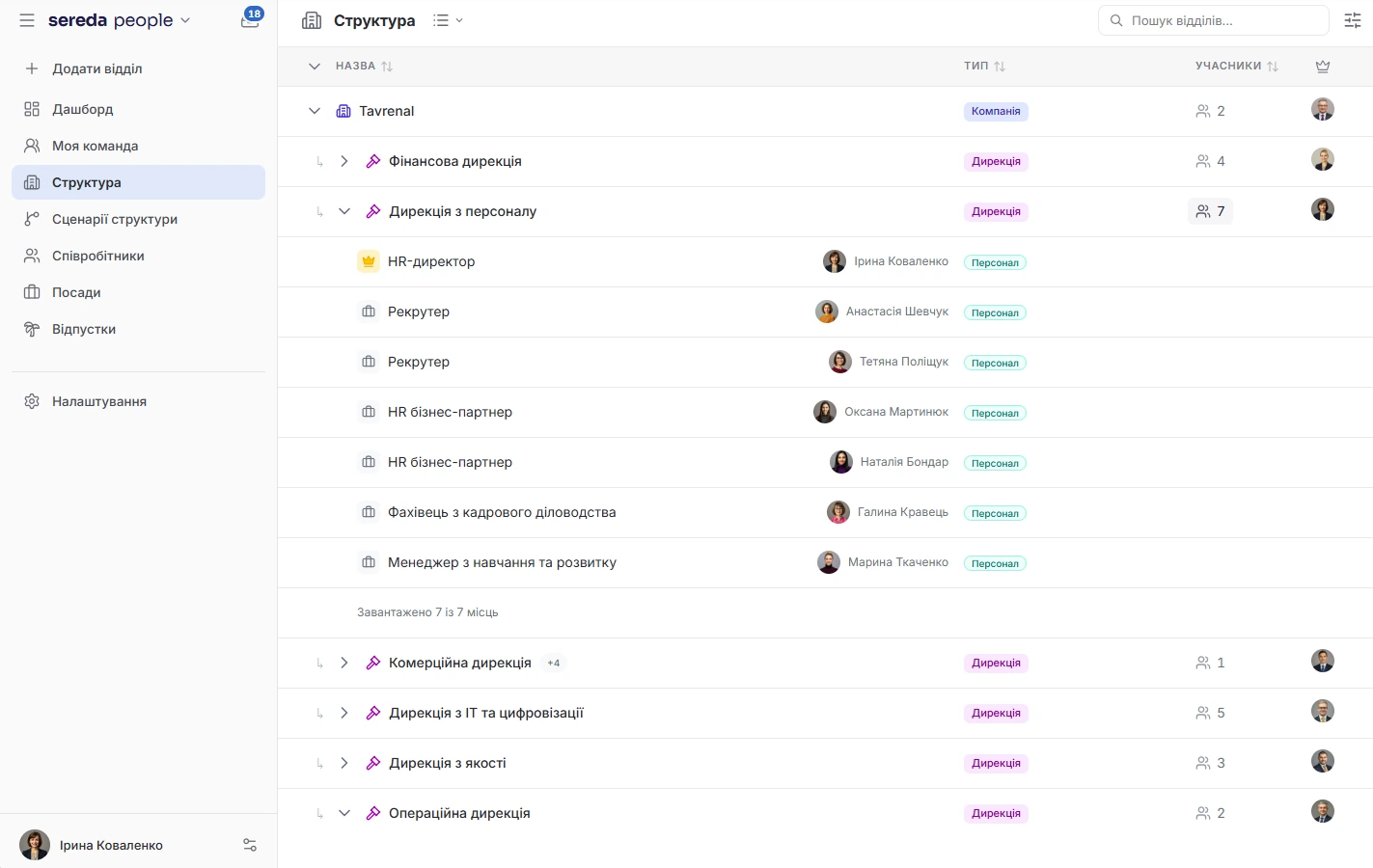
Structure that matches your staffing
Build a tree of units and positions: each unit gets its set of positions and its number of staffed slots. The dashboard shows units with empty slots and units without a manager.
Appointments. Appointments, transfers, and terminations are recorded with history by person, by unit, and by staffing position. A personnel change can be scheduled for a future date.
New people. Hires who could not be placed are collected in the “Hired, awaiting placement” panel with the reason. Terminated employees go into a pool, from which they can be hired again.
Scenarios: rehearsing a reorganization
Change the structure in a scenario without touching live data: move units, add positions, change reporting lines, and see how the map changes. Scenarios can be compared with each other, and the system shows conflicts.
Comment right on the map, save named versions, and return to an earlier idea. Branches of the structure can be saved as templates.
A scenario goes to approval: it is approved, sent back for revision, or rejected. After approval, the structure takes effect immediately or on a chosen date. Scenarios are available to the admin role.
Directory and org chart with visibility you control
The employee directory searches by name and filters by unit. The card shows position, manager, location, and contacts. The org chart collapses and expands, shows a single branch, and searches for a unit.
What to show. The admin decides which fields are visible in the directory: photo, position, department, hire date, birthday, phone, personal email. The directory or the org chart itself can be turned off.
Own profile. An employee updates their own profile themselves, if this is allowed in the settings.

Employee profile without folders full of files
You create additional fields yourself: text, number, date, a choice from a list, several options, yes/no, link, email, or phone. They can be arranged into sections of the profile.
Upload files up to 10 MB and specify the type and expiration date. For each type you set who sees the document: only HR and admins, HR with the manager, or the employee as well.
The system generates PDF orders for hiring, transfer, termination, and vacation from fixed templates: HR specifies the number, date, and basis. A document can be signed via Vchasno.EDO: send it to the employee, track the status, and download the signed archive. This requires connecting a Vchasno.EDO account.
Access by zones and change history
You can restrict a person's view of the structure to selected units and specify which modules are open to them. The admin manages zones and is not restricted by them. An empty zone means the person sees nothing, not that they see everything.
History. The profile has a change history: who changed what and when.
My team and 1-on-1 notes
In the “My team” section, a manager sees their people and the state of their meetings: regularity, pairs that need attention, open agreements. An admin can view the team through the eyes of a selected manager, but without the contents of the notes.
Each pair, a manager and a direct report, has shared notes: topics for the next meeting, private or shared entries, agreements with deadlines. A meeting can be started and ended, and one held offline can be recorded after the fact. If Goals is connected, a snapshot of the goal is inserted into the notes.
Only the two participants of the pair see the contents of the notes. There is deliberately no exception for admins, HR, or superadmins.
The rest of Sereda's modules build on People
Visibility is set by field, document type, and zone
Document visibility is set by type: only HR and admins, HR with the manager, or the employee as well.
The admin turns directory fields on and off separately: photo, position, department, hire date, birthday, phone, personal email.
Profile changes are written to the history: who changed what and when.
How Sereda protects dataCan I rehearse a reorganization without touching the live structure?
Yes. You change the structure in a scenario, compare options, and discuss them on the map. Live data changes only after approval, immediately or on a chosen date. Scenarios are available to the admin role.
What happens to a new hire who has no slot in the staffing plan?
The hire lands in the “Hired, awaiting placement” panel with a reason: the unit and position combination is not in the staffing plan, the job opening has no unit or no position, or the unit is closed. From there, the hire is placed.
Is electronic signature supported?
Yes, via Vchasno.EDO: the document is sent to the employee for signing, the status updates every 15 minutes, and the signed archive can be downloaded. This requires connecting a Vchasno.EDO account.
Can I create my own order templates?
No. There are four fixed templates: hiring, transfer, termination, and vacation. HR specifies the number, date, and basis.
Can an admin read the 1-on-1 notes?
No. Only the two participants of the pair see the contents of the notes. There is deliberately no exception for admins, HR, or superadmins.
Can I restrict which units a person sees?
Yes. You select the units and the modules open to the person. For now, the boundary restricts the visibility of the structure and the modules, but not individual actions inside modules.
We'll show you People on your structure
30 minutes: we'll go through how your departments, positions, and staffing are set up today and show how this will look in Sereda.